Today is Ana’s birthday, so David and I spent some quality time in the kitchen getting this cake made. It turned out well, and David’s choice of toppings is quite the addition!
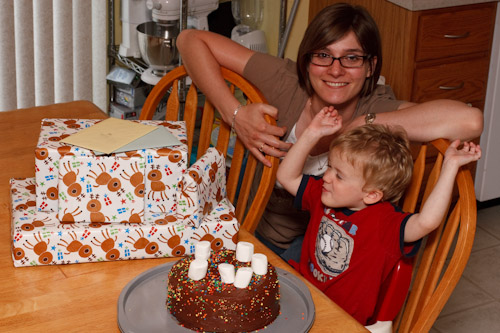


Happy Birthday Ana, We Love You!
Ramblings of a geek with a few hobbies…
Here’s the garden Ana has put in with David’s help. Unfortunately there are no photos of all of the digging and planting David was doing, as I was busy working on getting the deck washed.

The fence around the garden is new this year and is much more substantial than the one last year. Here’s to hoping it thwarts those rabbits. I’ve already told Ana that if it doesn’t work we’re upgrading to lasers.
If you use Visual Studio 2008 and install Microsoft Office 2010, it looks like there’s a very good chance your Visual Studio Web Designer will be clobbered. The symptom is when you go to visually edit a web page (html, aspx, etc) in Visual Studio, it will appear to completely lock up. Actually, I think what is happening is a message box is popping up, UNDER Visual Studio so you cannot click it or do anything but End Task to close Visual Studio.
Some searching around quickly came up with a few things to try.
You need to run “C:Program Files (x86)Common Filesmicrosoft sharedOFFICE12Office Setup ControllerSetup.exe” and select Repair (drop the “(x86)” portion if you’re running 32-bit).
On one of my machines, this was sufficient to repair the problem and Visual Studio went back to normal. However, on another computer I had to completely uninstall that software by selecting Uninstall instead of Repair. When that is done I then ran the Web Designer Core setup from the Visual Studio CD located at WCUWebDesignerCoreWebDesignerCore.exe. Be aware that if you were running VS Service Pack 1, you’ll want to reapply it after that setup completes.
One the topic of the Office 2010 install, I must say that my experience has been dismal. In addition to this problem of breaking Visual Studio 2008, on one of my machines I had to manually uninstall Office 2007 because the new 64-bit setup detected that the old version wasn’t copletely gone after uninstall. As you can guess, this was a pretty lengthy process, following a document from Microsoft led to about 10 minutes of hunting down and deleting various directories, files, and registry keys. Ouch.
Office 2010 is a nice upgrade, but Microsoft sure seemed to have botched the install.
I’m doing a little photo and video editing as the weekend winds down and thought I’d post these for all 2 of you that follow this blog. Here’s David during his two games of bowling, in which he scored a combined 46! He gets emphatic about doing it himself, so those are 100% his.
And to wrap up the weekend, he took a few swings off of the tee.

Notice the goggles – apparently he forgot to take them off after his work in the lab.
Updated: embedded video from Vimeo instead of MotionBox.
For a couple years now, I have been using Webhost4Life to host my Chef website, ejichef.com. At $10-$12/month, they weren’t the cheapest option out there for Microsoft-based shared hosting, but they also weren’t the most expensive. All-in-all I never had any major problems with them and their support was reasonably responsive (again, given the cost).
I have learned that the company was recently purchased, and I had been getting emails about an impending migration to a new hosting “platform”. My site’s turn was in the middle of the week last week, and I received an email when it was complete. I quickly visited my website and navigated around, it all looked ok. At first.
A day later when I received my daily download report, I saw there was absolutely no traffic to my download (hosted elsewhere). A little investigation showed that during the migration they had deleted all of my custom DNS records. Frustrating, for sure, but not terrible. I logged in and added the records which inexplicably caused my site to go down.
I chatted with a support rep online, who didn’t even try to solve anything and immediately created a ticket and told me it would be quickly resolved. 8 hours later there had been no change to the ticket so I chatted with someone else and was fed the same 4 auto-response lines I have learned to be the extent of their services. Once again I was assured it was being worked on right now and will be fixed in 2 hours at most.
10 hours later (around 18 total) I finally received an email that it was fixed. What complex operation took the skill and expertise of an engineer? Restarting IIS.
Strike 1.
Another day or two goes by and I go to look at the contents of the database that was migrated, and find that it is completely empty. The schema was migrated but none of the data. What were they thinking? I went to take a backup of the old database, but found that I needed someone in tech support to do it. After another chat, I was told they had to create a ticket to have the backup and restore done again. I have never seen this ticket or heard if it has been completed (I had my own backup which I restored elsewhere, so it wasn’t critical). Strike 1.5.
Shortly after this, a couple Chef purchases came through but the license key generation code failed. After some digging, I find that the problem is permissions-related and I gather all of the links and information needed to create a very detailed support case. I created submitted the ticket, and here I sit on day 4 with it still not functioning. Strike 2.5.
What has thrown me over the edge is my interaction with the support team over these past 4 days. The only activity I see on the case are my inquiries into the status – not a single word back about what is going on, an ETA, or a request for further information.
I have chatted online with support too many times to count, each time being told (after putting me on hold for 4-5 minutes) that they had just personally talked with an engineer and they were working on it as we spoke. I was repeatedly assured that the fix was at most 2 hours away. Multiple times I was told they had just escalated the ticket to High Priority, which I’ll note is never reflected in the ticketing system. During the first conversation the technican was in a hurrty to get off of the support line and told me that they had reproduced the error (and of course it will be fixed in 2 hours..), even though I had not given them instructions on how to reproduce it. They quickly diverted the conversation when I brought this to their attention.
I had been seriously considering upgrading my Webhost4Life account to a VPS (virtual private server) before all of this happened. I’m thankful this all happened before I signed a year-long contract because I cannot imagine paying the VPS price and ending up with support like this.
During the frustration of that first 18 hour outage I opened an account with KickAssVPS.com and just yesterday made the decision to transition everything over to it. As of right now I am no longer using my Webhost4Life account and am trying to cancel it. While the cost is obviously more expensive than shared hosting, the KickAssVPS experience has been nothing short of excellent and I’m looking forward to using them for a long time to come.
Hopefully my cancellation will be complete soon and I can say goodbye Webhost4life, and good riddance.
Tonight is David’s first night in his new toddler bed!

He has been excited since this afternoon when he helped me put it together, so he hopped right in tonight at bedtime. It remains to be seen how long it will take him to get to sleep now, though 🙂
Last night I got out the ring flash and asked David if he could make some funny faces for me. Here’s the result!

Update: more photos in the gallery.
This past Wednesday I decided it would be fun for us to get out of town for the weekend, so away to St. Louis (Aint Looooois as David says) we went. Jay and Katherine also came along with us, which was nice since we haven’t seen them too often of late.
We left Springfield Friday evening after work and got to the hotel in downtown St. Louis right around 8pm. David crashed quickly and we played a card game I was terrible at until it was time to get some sleep.
After getting some breakfast on Saturday morning we headed over to the City Museum. Neither Ana or I had ever been there before but have heard lots of great things about it. Now all I have to say is that we all had a blast and I can’t wait to get back there. So much fun!

After the museum we had lunch at the delicious Schlafly Tap Room and headed back for a much needed nap. We wrapped the day up with dinner at the Galleria, an interesting search for a Walgreens, and more card games.
Today we went up to the top of the Arch and had more good food for lunch before the drive back to Springfield. David had a blast and it was a nice getaway for all of us.

If you’re a C# developer making your first foray into the land of iPhone and Objective-C programming, you probably have a question or two. I recently started working in earnest on an iPhone app, so I figured I would write down some of the tips I’ve picked up thus far.
Here they are in no particular order. No particular level importance. Just some things that I had to learn and which may help you as well.
Objective-C
Reference Counting
Interface Builder
Ok, I’m tired of typing now. That ended up a little longer than I intended but I hope it helps you to get up to speed.
This morning we were at Lowes and ran into the bi-monthly kids’ workshop in progress. They were putting together a smal tic-tac-toe toy and David was instantly hooked. Since they were wrapping up, we bought the smallest hammer we could find for him and took one of the kits home with us.
Later in the day after his nap, we got to work in the basement.


Here’s to David’s first building project! More photos in the gallery.

