that I promised a new photo of David. Here you go 😉

Ramblings of a geek with a few hobbies…
I’ve run into some problems with Lightroom being extremely slow when using the new localized adjustment brush – a great new feature in 2.0. After a few strokes with the brush, it would become very slow and unresponsive.
This morning I looked around on the Adobe forums and found some people saying they had some luck adjusting their NVidia 3D settings. So I gave it a shot, and so far seems to have cleared things up. Here’s what I did.
Open up the NVidia Control Panel and set move the Image Settings slider from Quality to Performance. This will change global performance, so we won’t leave it here. This is just so we can write down what settings get set when it’s in Performance mode (versus Quality). Note on the screenshot, the slider should be all the way to the left – apparently I took the screenshot before the UI updated all the way 🙂
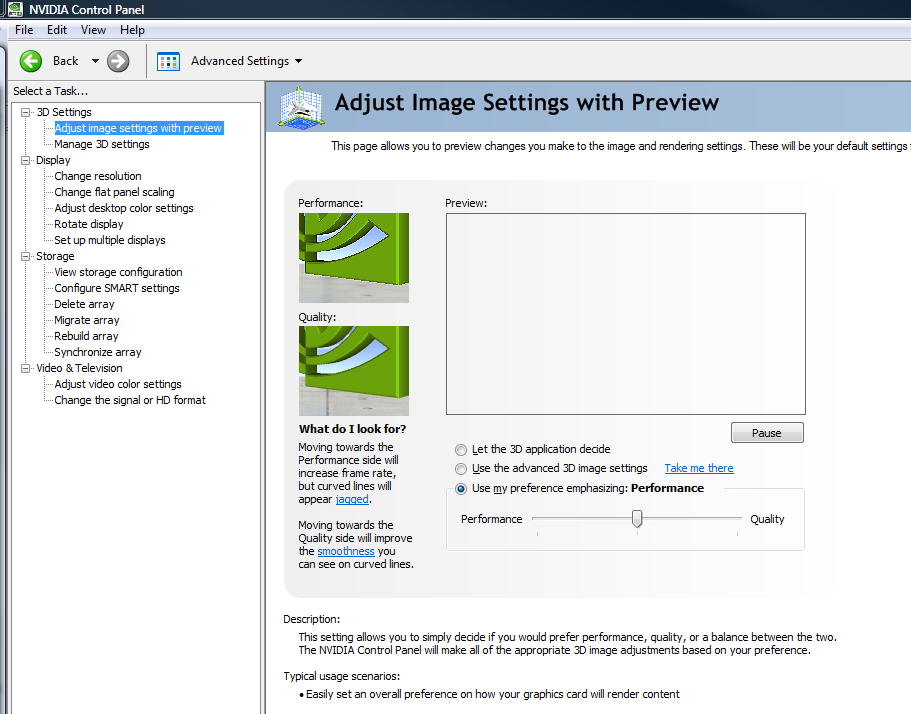
Now go to the Manage 3D settings and take note of the settings that it applied. Here are mine:

Go back to the slider and put it back to Quality. Then come back to the Manage 3D settings, but this time sleect the Program Settings tab. Here’s where we’re going to tell the NVidia driver to use special (non-Quality) settings for just Lightroom.exe. Click Add, locate Lightroom.exe, then set the individual settings to what you took note of earlier:
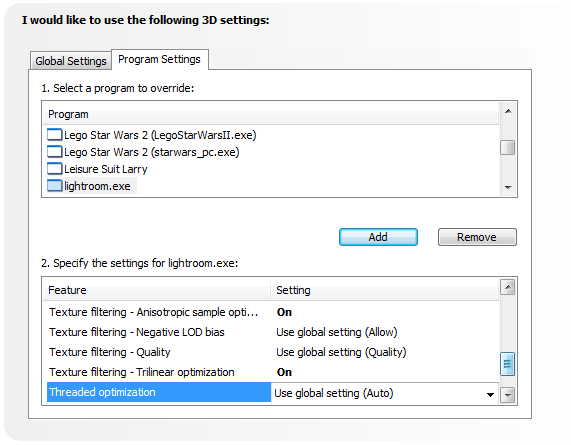
Click Apply and you’re good to go. Fire up Lightroom and see if you notice an improvement. I noticed the adjustment brush felt very responsive, but the overall Lightroom UI seemed a little more sluggish. This went away when I re-Enabled Triple Buffering (one of the last options in the window above). So far, it seems to be running much smoother.
Your mileage may vary, of course, but I hope this helps.
Last weekend Ana finished up painting and decorating a bathroom for David, so he has graduated from the baby tub into the real thing.

This was from the first time, complete with spongy alphanumeric characters he used to encode some messages on the tub wall. He liked Z. Alot.
We went to see the WWII B-17 that’s in town this weekend. I got lots of photos, and took them all in RAW for the first time. We’ve gotta run now, but here’s a sample. I’ll elaborate on some of the differences I’ve noticed with RAW versus JPEG in a future post.
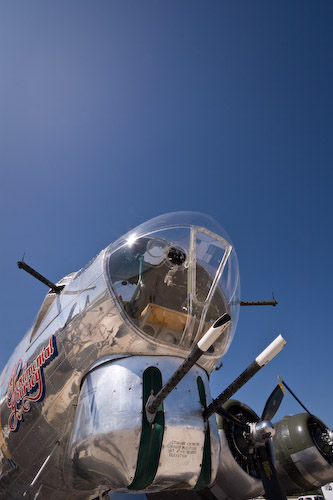
Update: A few more photos are up now.
Last week I purchased Adobe Lightroom 2, the new version of the software I use to manage and edit my photos. Ever since trying out version 1.0 of the product, I have been thrilled. It’s easy to use, lets me get great results from my photos, and helps manage the ever-growing stack of images (20,000+ right now).
I’ve been testing out several of the new features and must say that I’m quite impressed, it’s a great upgrade to one of the most fun pieces of software I use.
To get up to speed on using the new stuff (and some things I didn’t know about 1.x), I’ve been watching lots of videos from Lightroom Killer Tips. A couple days ago I downloaded beta camera profiles which can be used from inside Lightroom 2 to assist in the processing of RAW images, and there’s a nice video posted today about them. I’ve always just shot JPEGs because I found RAW to be a bit too much work to deal with (did it look like this? or this? or this? or this?…). But with these camera profiles and the power of Lightroom, I may reconsider and give RAW another shot. Is it worth it? Anyone?
There’s one feature I was hoping Adobe would have added to Lightroom, and that’s the ability to fix barrel distortion. I know some cheap 3rd party apps do it well, but I’m too addicted to the non-destructive edits that Lightroom provides. Oh well, maybe in another version 🙂
David thought he could lick his way through the newly installed gate. Didn’t work so well.


With just a few minutes to spare, David is 8 months old!

It was pretty challenging this time, now that he’s mobile he doesn’t quite sit in one spot very long. Sure makes lighting difficult 🙂
Today we had such great weather that we decided to head to the 2008 Illinois State Fair with David. I figured he would only last a short time before getting tired, but instead he had a blast and we were there for nearly 4 hours.


Today was absolutely miserable outside. I was working in the garage on my latest building project and the air was so think it felt like you could swim in it. I’m building a utility box/cabinet of sorts to go out by the garden for Ana, and since it’s fairly large I can’t do much of the construction in the nice and cool basement. I’ll have some pictures of that soon.
The rest of the day and evening was spent playing with David and, of course, taking some pictures.


 The Johnson Blog