The Johnson Blog

Ramblings of a geek with a few hobbies…

Author: eajhnsn1

  • One Year

    Today was David’s first birthday!  As has been the monthly ritual, I got the camera equipment out and took a few photos.  (More photos in the gallery)


    In one sense it’s incredible that it has been a year since he was born; but in another it feels like he has been with us all along, and we’ve experienced so much:  turning his head to our voices; reaching for toys; rolling over; giggling; trying to crawl; crawling; picking out his favorite books; snuggling up for reading time; trying to walk; walking; and on and on.  

    His smile is infectious, his laugh even moreso.  And I could sit for hours just watching him concentrating and learning about the world around him. 

    Tonight he received a set of small toy trucks from my parents and he sat and ran the trucks over every surface he could find, making little engine noises.  He also received a toy filled with gears, which he occupied himself with by spinning and tinkering – I couldn’t help but just step back and smile; that’s my boy.


  • Lights are Up

    It was cold and a bit windy, but I was able to get the Christmas lights put up this afternoon.

  • Christmas Tree

    Last night Jay and Katherine came over for dinner, followed by a trip to Lowes to each get our Christmas trees. Their selection was pretty dismal, and Ana and I eventually bought the very first one we look at. Go figure.

    So today we got the tree put up, and boy does David enjoy it.


    These pictures took some experimenting to get, my first attempts at using the flash and keeping the backgound as close to its natural luminence.  Not too bad, I’m sure I’ll be getting alot more practice with as much as David likes the tree 🙂

  • iTunes is iAnnoying

    Too bad the iPhone makes you get sucked into the world if iTunes – because it sucks.  I knew this going in, but it still isn’t fun when the limitations smack you in the face.

    The limitation of which I speak is its inability to detect new files in its directories, automatically update its library database, and make it available for syncing and playing.  I spent a while fumbling around the UI looking for the option to turn it on, only to be ultimately disappointed by a few google searches. 

    My initial plan was to take home movie clips (btw, MediaCoder is pretty handy..) and drop them into a directory managed by iTunes so they’d automatically get sent to the phone, but now I was going to have to add additional steps of manually adding the new videos each time they get created.  That’s just too much work and I’m too lazy.

    I ran across an app or two that would do this updating for you, but instead decided to go a different route – creating a podcast that iTunes would auto-update and sync to the phone.  Tuesday night I whipped up an ASP.NET request handler (IHttpHandler) to generate feeds based on directory contents.  So now I’ve got the auto-updating capability I was initially looking for: after I create the video, I just drop it into a directory accessible by my webserver and iTunes will pick it up the next time it requests the feed.  As an added bonus, David now has a podcast for family and friends 🙂

    Some more details on the code below the break.

    (more…)

  • Box


    Need I say more?

  • Ammo and… backups?

    OK, just a few more words about my data backups.

    Last week I ordered a few Army Surplus, 30 Caliber Ammo Cans, they arrived today.  What the heck are these for, you ask?

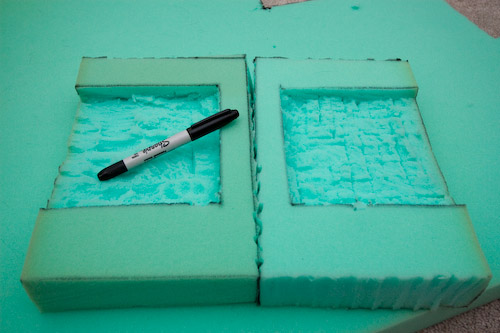
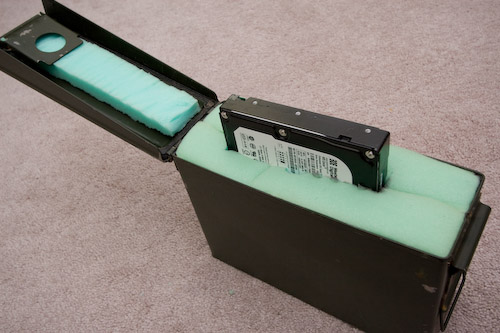
    Well I thought they could make a great way to transport and store the hard drives I’m going to be rotating off-site.  So tonight I got to work with a knife and some dense foam, to create what should be a pretty sturdy (and water-resistant!) hard drive case.

    And here it is, with a spare drive not quite halfway pushed in.  The foam cutting was crude, and it may not be pretty, but I like it.

    The cans are $4 apiece + shipping.

  • Hippo Comes to Life

    David has accumulated plenty of coats and jackets, the the point that it seems like they’re everywhere.  Last weekend I thought it would be fun to make something to hang them from.  Well, since David enjoys hippos….

    I started off drawing the little guy in PhotoShop Elements with my tablet…

    (wow, enough dust in there? sheesh)

    Printed, cut it out, traced it onto a piece of wood…

    A few minutes of jigsaw work and it’s ready for some paint!  Notice the wooden version lost a tail – it was just too thin for my skills and tools to be able to cut.  After the paint I’ll be putting it atop another piece of wood along with some coat hooks.

    It was fun and took just over an hour from drawing to cut-out.


  • iPhone

    My 2.5 year-long haitus from being connected on-the-go is over.  I finally took the plunge and switched from Sprint to AT&T and bought an iPhone (8GB).  Sprint has provided great service over the past 5+ years, but their phone selection has been lacking.  Sorry, Sprint, the HTC Touch Pro and/or Diamond just don’t compare.

  • Backups and my first foray into PowerShell

    First, some background.

    Last week I received the final pieces of my backup strategy, a pair of 500 GB hard drives that I will be rotating periodically to some undisclosed location that isn’t my house.  Right now, my fileserver makes backups and sticks them on a mirrored RAID array.  These drives are simply to hold extra copies of these backup files in the event of something Very Bad(tm) happening to our house.

    Since it will be leaving my house, I decided I wanted to make sure the data was wrapped up in a nice blanket of encryption goodness.  For ease of use, I have an eSATA docking station that allows the drives to be ‘hot-swapped’ – and for further convenience I’m attaching it to my desktop instead of the server so that it will be harder to forget to rotate the drives out (in the basement = out of sight, out of mind).

    So all of this presented an opportunity to learn the relatively-new command line environment, Microsoft PowerShell. 

    The scripts (feel free to download) do the following:

    1. Mount my hard drives as encrypted TrueCrypt volumes, using a keyfile.  Now anything written to the drives are wrapped in that nice encryption blanket I mentioned earlier.  Mmm… scrambled bits and blankets.
    2. Checks the amount of space available in the target directory and deletes the necessary number of old backups to make sufficient room for the new backup copies.
    3. Calls on RoboCopy (included in Windows Vista) to do the actual file copying.  Note that in my testing, I found RoboCopy to be 3-4 times as fast as xcopy across the network.
    4. Sends off a completion email
    5. Dismounts the encrypted volume

    Since this was my first use of PowerShell, I’m sure there is a lot of room for improvement and that I’ve only just scratched the surface.  That said, I learned enough about PowerShell that I’m going to keep pushing to learn more.

    A few things I like:

    • It was very easy to use several diffferent MS technologies from the one script.  I seemlessly use .NET objects, COM objects, and even pull in some WMI interaction to get the job done.
    • Finally having regular expressions available as first-class citizens in scripts – a.la perl and others.  No absolute need to explicitly fire up the .NET regex classes all the time, even though that’s definitely possible and useful too.
    • Finally not having to rely on essentially screen-scraping command outputs. Yay for objects!
    • Writing custom cmdlets in C# is pretty straightforward.  I started down this route to make my own Start-Backup cmdlet, but decided against it since I specifically wanted to learn PS scripting and not just write the solution in C#.

    A few things I dislike:

    • using -lt and -gt (and similar) instead of “<” and “>” for comparisons and equality.  It just feels wrong.
    • Lack of an official language reference – I couldn’t believe one wasn’t available, and this left me in the dark and learning by trial by error on some key behaviors of powershell (like function return values, for instance).  The “documentation pack” has a crappy quick-reference/cheat-sheet sort of thing, but not a real spec.
    • How hard it was to track down the PowerShell SDK – note: you have to download the Windows SDK and blindly choose a few installation options to get the SDK installed.
    • I made the PowerShell crash a few times.  That shouldn’t be able to happen.