The Johnson Blog

Ramblings of a geek with a few hobbies…

Tag: Photography

  • Some Cool Barn

    Unfortunately I wasn’t able to make it to the Shoo-sponsored blogger Photowalk in Washington Park on Saturday, although it sounded like a lot of fun.  Maybe next time 😦

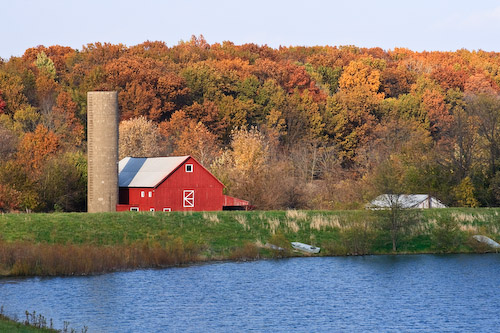
    However, this afternoon I was able to sneak out for a few minutes to capture a barn here in Springfield (off of Veteran’s Parkway) that I’ve had my eye on for a while.  When Ana and I were leaving the State Fair this year, she looked over and spotted it and we both agreed that it would look great in the fall.  And here we are, more great colors:

  • Oh the Colors!

    Today after work we went out to a lake park to enjoy the weather, the colors, and to take some photos (of course!). It’s very hard to believe that it’s already the end of October, isn’t it?

    Anyway, today was the first time I’ve made use of the Neutral Density filter I purchased over a year ago for my camera.  I originally ordered it to help take shots of waterfalls on our vacation, but it was delivered long after we departed.  If you’re wondering what a Neutral Density filter is, it’s a filter for the lens that darkens the image without any color tinting (that’s the neutral part).  This allows you to slow down the shutter speed to durations that would normally produce dramatically overexposed pictures.  We had some fun with it:

    Later we learned that David has been taking lessons from the great Obi-Wan.  Seriously, he was doing some serious re-enactment with this stick.


    The rest of the series are in the gallery, yell at me for access.

  • Lightroom 2.1

    Adobe releaed the much awaited 2.1 update to Lightroom this evening.  I’ve been using version 2 for a couple months now, and found it to be head and shoulders above version 1.x.  There were definitely performance problems, but once I made a few performance tweaks, it was usable and worth the headache for the new features.

    I just installed 2.1 and gave it a very quick walk through.  So far, it appears they have done a great job on the performance issues.  The general UI is back to being as snappy as I remember 1.x being, and the local adjustments brush introduced in 2.0 is now nearly instant even without the tweaks mentioned above.  Way to go Adobe, and thank you!

    I haven’t even looked at the feature list for 2.1 yet, I wonder what else was added…

  • Park

    Springfield had fantastic weather today, so we decided to head to a park.  The leaves are turning and the air is nice and crisp.  Gotta love it.

    After a while here, we headed to the zoo where David got to ride on a Hippo.  More photos available.

  • October, already?

    And before we knew it, it was October!

    David was outside for a while this evening enjoying the cool weather and the great sunset light (ok, that last part was me).

    Look, he sees his shadow!  Does that extend summer?

  • Busy, Busy Saturday

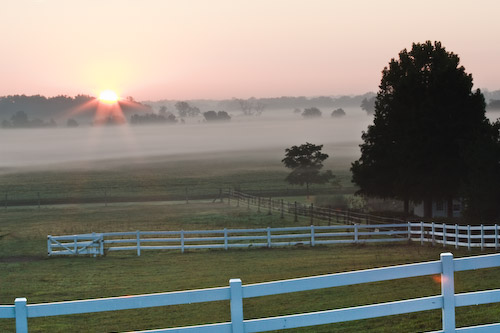
    Ever since we moved into our house I’ve driven right by a nice spot that has begging me to just get out of bed early with a camera to see  what I could capture.  The past couple weeks have brought these calls even louder, with the great sunrises and rolling fog.

    This morning I met up with Jay at sunrise and we wandered around near Route 29 at Hilltop Road, and got some pretty good shots.  I’m very happy with the results and think I’ll be getting a couple of them framed and put up in the house.

    Here are a couple of previews.  View the collection on my new, SmugMug hosted site ejiphotos.com.  Here’s a direct link to the slideshow.  Enjoy!

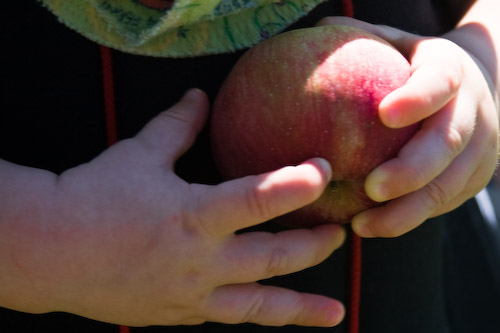
    We then made a trip to Carlinville, IL to Bloom’s Orchard for some apple picking. David had a blast and slept the entire way back, woo!

    Pumpkin Suicide is sad, and preventable 😦

    We finished up the day with Jay and Katherine stopping by for dinner and some TV. Happy weekend, everyone!

  • Lightroom 2: Output Sharpening

    Since installing version 2.0 of Lightroom, I’ve been ignoring the new export option for Output Sharpening.  It has been sitting there on the screen but I’ve always been in too much of a hurry to try it out and see the results.

    Over the weekend I decided to change that.  What it does is allow you to select how your photo will be displayed/printed and the level of sharpening you want applied when the photo is saved out to disk.  Ana and I were going to be getting the family portrait I took printed, so I thought it would be a good time for a side-by-side comparison.  I quickly exported two copies of the same photo, one without sharpening and one with Matte Paper, Standard as the sharpening options:

    I print our photos with Shutterfly, and by default they’ll print the filename on the back of the photo.  So I named one ForMatte and the other NoSharpening; now I can compare side-by-side without bias once I receive the prints (8×10, btw).

    Here are a pair of 100% crops from the two images.  As you can see, the ForMatte version looks less than desirable so I didn’t get my hopes up.

    ForMatte:
    NoSharpening:

    The prints arrived yesterday, and I was able to tell a very distinct difference between the tho photographs.  One looked a little fuzzy, something I had come to expect from matte prints and one of the reasons I have started leaning toward glossies.  The other looked very nice and sharp.

    Flip them over, and sure enough, the one with the Matte sharpening applied is the one that looked better.  Lesson learned. I’ll be applying that on all of my prints from now on.
  • Photo Hosting

    I have hosted my own photo gallery for around 7 years now and have been perfectly happy with my arrangement.  I first started with a homegrown php photo album and used that for a year or two before moving to Gallery, which I have used since.  In addition to using Gallery to display and share my photos, I used it as my archive of sorts – every photo was stored and backed up from there.

    That changed last year when I purchased Lightroom and my Canon 30D.  It quickly became the home of all of my photos and I’ve since only uploaded select ones to Gallery.  Backups are all handled directly on the Lightroom catalog and managed directories, and Gallery has pretty much turned into a mess.  Disk space has also become annoying as I’ve moved my Apache web server into a virtual machine.

    These things, in combination with my recent purchase (rental? lease?) of a MotionBox account for videos has gotten me thinking more and more about how I want to handle pictures.  Primarily I want more bandwidth, to ignore disk space concerns, prettier photo galleries, room to expand (customization, maybe even selling photos?, I don’t know yet), and a stable provider with a good history.

    So I’m trying out SmugMug.com.  They seem to fit the bill for all of the above, at a reasonable price.  It’s a 14 day free trial, so be looking for an announcement about my Gallery being shut down and some things moved to my SmugMug account.

    Stay Tuned!

  • DNG Codec for Windows Vista

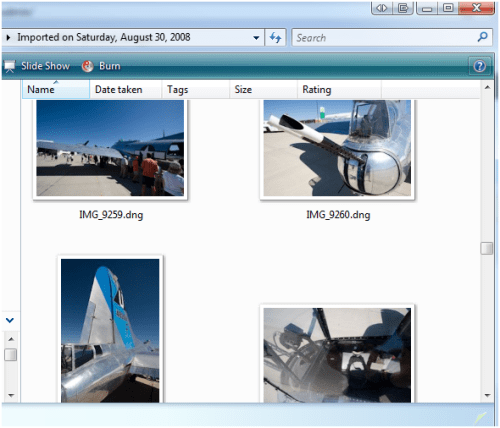
    Last night I came across a DNG Codec for Vista by Adobe Labs. If you’re wondering what the heck this is, it’s software that will allow you to view thumbnail previews of your .DNG (Digital Negative) photos. Pretty handy.

  • 9 Months Old

    Mr. David is 9 months old today!

    Once again I transformed our family room into our little photo studio to take David’s 1st year monthly photos. Once again, it was even more difficult than last time to get him to linger in one area, happily, long enough to get captured by the camera.

    See them all in Gallery, or via this PDF Slideshow.

    We also had some luck actually getting a family shot!