Happy 4th of July everyone!
We spent the morning taking a walk through Lincoln Memorial Gardens and generally just kicking around.
David brought his camera along too, and we had fun stopping every now and then to take some photos.
Ramblings of a geek with a few hobbies…
Tonight after work we headed over to the Sangamon County Fair. I had entered a few photos into the contest, none of which placed. But we had great weather for a good evening walking around and riding rides.
This was David’s first time riding any of the rides, and boy did he have a blast. I captured this photo while coming down from the top of the ferris wheel, and you can see the fear and excitement in his eyes. I love it 🙂
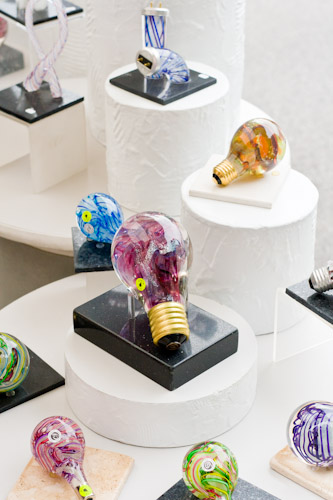
This weekend we went downtown to the Old State Capitol Art Fair. I always enjoy the photography most of all (shocking, I know), seeing such a wide variety of styles and subjects helps to inspire as well as solidify what I do and do not like.
I also took the opportunity to try and get some more interesting photographs of the Old State Capitol. I didn’t end up with anything outstanding, but it felt good to just walk around and focus on this for a while.
The morning started off looking like it was going to rain, but cleared up shortly after I took this.
This one was from a week or so ago, but it fits the theme. It’s surely not the typical photograph of this building.
A colorful exhibit.
Here’s David taking a breather from all of the walking. He has about as much fun as a 3 year old can at an art fair.
Here are the rest of the photos from the Old State Capitol.
A few weeks ago I imported photos from my iPhone into Lightroom 3. Ever since, I’ve had Lightroom crash on several occasions when I’ve gone to import photos off of a Compact Flash card. I’m running Windows 7, 64-bit. I was resorting to a reboot to clear it up, but tonight I had too much other stuff running that I didn’t want to stop for a reboot. So I started looking around.
I noticed that in Windows Explorer, there was a “phantom” iPhone appearing when my phone was definitely not plugged in. Here’s how it looked:

My theory is that Lightroom was trying to enumerate devices and was getting to this one and failing. Unfortunately there isn’t an option to Eject the device from here, so I turned to Devices and Printers in the Control Panel. In the list of devices, sitting down in the Unspecified section was one called Apple Mobile Device USB Driver. If you right-click and select Troubleshoot, Windows does a decent job at figuring out that there is no longer a device attached and removes it from the system. No more phantom iPhone.
I opened Lightroom back up, clicked Import… and Voila! Fixed!
This afternoon I was able to spend about 3.5 hours working in the basement on Ana’s craft table. I’m almost done with getting the trim on and will be starting on the doors and drawers next. It’s taking a while since I only average 3-4 hours per weekend on it, but so far so good.
Here’s one of the two table ends, with trim complete.

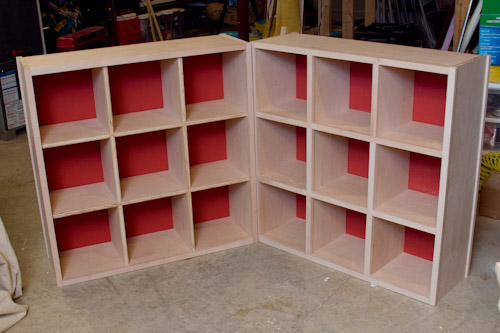
The center column is going to be open cubbys, while the bottom corners are going to each hold two drawers. The remaining will have doors.
Here’s the pair, the one on the left still has some trim waiting for me to complete.
One evening almost two weeks ago, I decided to go downstairs to work on my recent woodworking project. This was after 20 minutes of going back and forth in my head on whether or not I should – it was late, after all, and I was a little tired. Accidents happen when people are tired. So at 10:20pm I finally got up off of the couch and went to work.
Things were going well, I was making quite a bit of progress. This is the first project I’ve done where I’m using dado joinery and I was getting used to a new tool – a Precision Router Dado Jig riding on a new Straight Edge clamp (seen below). After one of the first cuts, I thought it would be good to test the fit. I slid the other piece of wood into the groove; it was a little tight. So I pushed. Then a little harder.
Then at around 11:45pm, that piece of wood gave way. And my wrist took a quite dive right INTO the straight edge clamp.
Right there, into that nice sharp groove. A split second later I was staring into my wrist, right at a tendon, through the 2″ slice it gave me – parallel with my wrist starting at the base of my palm. It still gives me the chills thinking about it.
Luckily Ana hadn’t gone to sleep yet, so we called my parents (thank you!) to come over to be at the house with David and immediately rushed to the hospital. Ana drove as if she has a secret hobby of watching NASCAR – it was pretty impressive, even flying past a cop through a red light on the way.
Luckily the bleeding had mostly stopped about halfway to the ER, and St. Johns was remarkably quick at getting me taken care of. The doctor checked it out and told me that I had just narrowly missed my tendon and that it should heal up nicely. 10-12 stitches and an hour later, I was back at home and heading to bed.
The next day, David noticed some of the dried blood on my leather apron as he was walking by a chair it was draped over. “Did you make a mess, Daddy?” Yes, Yes I did.
Last weekend I went back downstairs to resume work on the project and you’d think that straight edge had a force field around it the way I was maneuvering. I’m always very careful when I have the power tools out, go figure that it would end up being a ruler that got me. I’ve now added “Anything sharp nearby?” to my mental checklist before starting any new cuts.
Two days go I got the stitches removed and am going mostly without bandages, save for the trips to the gym where I want a little protection. It’s still a little ugly but hopefully the scar won’t be too bad.
I told Ana that she’ll never be able to get rid of this table, because I’ve put my blood into it! She responded, jokingly, that it still wasn’t finished yet.
Since I haven’t posted in a while, here are a few photos of David playing in the snow this month. February has brought plenty of the stuff, and we’ve made the most of it, but boy are we ready for Spring!
Sledding isn’t quite as fun without the big hills, be we find ways…
At the start of one of the snow storms, I quickly setup my camera to try my first timelapse. I wish I would have had a better target to point the camera at, I’ll have to work on that for next time.
If you are running FogBugz on IIS 7.5 (Windows 2008 R2), and trying to submit crash reports via scoutSubmit.asp, you may find that you are greeted with HTTP 404 errors. I spent a few mintes tracking this down, and it’s due to the length of the querystring used in the request, and IIS 7.5’s request filtering.
You’ll need to edit FogBugz’s web.config and add to the System.WebServer node the following:
<security>
<requestFiltering>
<requestLimits maxQueryString="15360"/>
</requestFiltering>
</security>
That will set the querystring length to 15KB, which should suffice.
A special “Thank You” goes out to Data Robotics for sponsoring the Daddy On Board Podcast (put on by Clayton Morris and Mike Quackenbush), which I watch and listen to regularly. It’s a fun podcast put on by a couple of new fathers that discuss a wide range of baby and toddler-related topics. Good stuff and worth a listen, check it out.
Anyway, several weeks ago I tossed my name into a drawing they were putting on for a new Drobo, and won!
For those unfamiliar, a Drobo is a small box that holds several hard drives and makes them function as one, larger drive. More importantly, there is data protection built-in so that your data is safe even if a drive (or two, depending on configuration) dies.
It arrived today, the brand-new edition of the Drobo S. This new one has USB 3.0, Firewire, and eSATA and can hold up to 5 drives. I don’t have any USB 3 ports here yet, so it’s currently connected to my desktop via the slower USB 2. A USB 3 card should be arriving early next week 🙂
Here’s the Drobo with 3 new 1TB drives (yes, I label my drives so I know how old they are):
Setup was a piece of cake, and it fits perfectly in a small table next to my desk. Here it is ready to start storing lots of data:
I have it configured to be able to survive 2 drives failing, so that 3TB of raw storage really only gets me 1 TB of usable space. But that’s fine, I’m paranoid about hard drives eating my data.
Now that it’s here, I am moving 223 GB of home videos to it that were too large to fit in with my standard backup procedures. Then I need to figure out where exactly this will fit in with all of my other data storage – I’m pretty sure it will just hold backups, but which backups (I already have 2 RAID arrays here with further copying to external drives for off-site rotation) is the question.
I came across the need to captalize the first letter of every word (I needed this for names, including hyphenated names) with PowerShell, and learned that PowerShell 2 has a great feature that comes in handy here.
I first tried using the PowerShell -replace operator but you can’t do function calls or anything complex in the replacement parameter. So $name = $name -replace 'b(w)', '$1.ToUpper()' doesn’t work.
If I were using C#, I would just use Regex.Replace, making use of a MatchEvaluator delegate (using lambda expression syntax): name = Regex.Replace(name, 'b(w)', m => m.Value.ToUpper());
Thankfully, in PowerShell 2 you can now use an script block as a delegate. So my problem is solved with $name = [Regex]::Replace($name, 'b(w)', { param($m) $m.Value.ToUpper() });.
If you’re unfamiliar with the MatchEvaluator, for each regular expression match encountered, the delegate function gets called and that function’s return value is the string used as the replacement. So in my example here, 'b(w)' matches the first letter of every word. That letter gets passed to my script block as a .NET Match object, whose Value is the matched letter. The returned uppercase version of the letter is put back into the original string. Done!