The Johnson Blog

Ramblings of a geek with a few hobbies…

Tag: Tech

  • Lightroom 2.1

    Adobe releaed the much awaited 2.1 update to Lightroom this evening.  I’ve been using version 2 for a couple months now, and found it to be head and shoulders above version 1.x.  There were definitely performance problems, but once I made a few performance tweaks, it was usable and worth the headache for the new features.

    I just installed 2.1 and gave it a very quick walk through.  So far, it appears they have done a great job on the performance issues.  The general UI is back to being as snappy as I remember 1.x being, and the local adjustments brush introduced in 2.0 is now nearly instant even without the tweaks mentioned above.  Way to go Adobe, and thank you!

    I haven’t even looked at the feature list for 2.1 yet, I wonder what else was added…

  • Photo Hosting

    I have hosted my own photo gallery for around 7 years now and have been perfectly happy with my arrangement.  I first started with a homegrown php photo album and used that for a year or two before moving to Gallery, which I have used since.  In addition to using Gallery to display and share my photos, I used it as my archive of sorts – every photo was stored and backed up from there.

    That changed last year when I purchased Lightroom and my Canon 30D.  It quickly became the home of all of my photos and I’ve since only uploaded select ones to Gallery.  Backups are all handled directly on the Lightroom catalog and managed directories, and Gallery has pretty much turned into a mess.  Disk space has also become annoying as I’ve moved my Apache web server into a virtual machine.

    These things, in combination with my recent purchase (rental? lease?) of a MotionBox account for videos has gotten me thinking more and more about how I want to handle pictures.  Primarily I want more bandwidth, to ignore disk space concerns, prettier photo galleries, room to expand (customization, maybe even selling photos?, I don’t know yet), and a stable provider with a good history.

    So I’m trying out SmugMug.com.  They seem to fit the bill for all of the above, at a reasonable price.  It’s a 14 day free trial, so be looking for an announcement about my Gallery being shut down and some things moved to my SmugMug account.

    Stay Tuned!

  • Internet Explorer 8 Beta

    Late this afternoon I decided to download and install the beta of IE8.  Total usage time since I’ve installed it has been maybe 5-10 minutes, and I’m going to uninstall it.

    Why?  I downloaded a zip file, but when it completed it was deemed corrupt.  Tried 2 more times with the same result.  Fired up FireFox and as expected, it downloaded just fine.  I’m not going to waste time on the beta if it can’t even download a file correctly, that’s sooooo 1998.

    Thanks Microsoft.

  • DNG Codec for Windows Vista

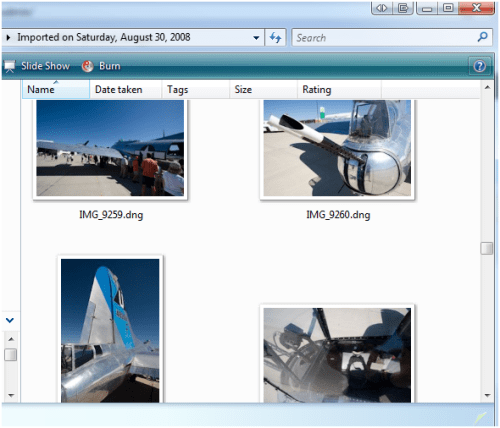
    Last night I came across a DNG Codec for Vista by Adobe Labs. If you’re wondering what the heck this is, it’s software that will allow you to view thumbnail previews of your .DNG (Digital Negative) photos. Pretty handy.

  • You’ve received a greeting ecard

    Has anyone received this email, over and over and over lately?

    On normal days, I just delete. But since today is my birthday, I thought I’d download that innocent looking e-card.exe and see just what kind of cool birthday card greetingcard.org sent me.

    (more…)

  • Lightroom 2 and NVidia Performance

    I’ve run into some problems with Lightroom being extremely slow when using the new localized adjustment brush – a great new feature in 2.0.  After a few strokes with the brush, it would become very slow and unresponsive.

    This morning I looked around on the Adobe forums and found some people saying they had some luck adjusting their NVidia 3D settings.  So I gave it a shot, and so far seems to have cleared things up.  Here’s what I did.

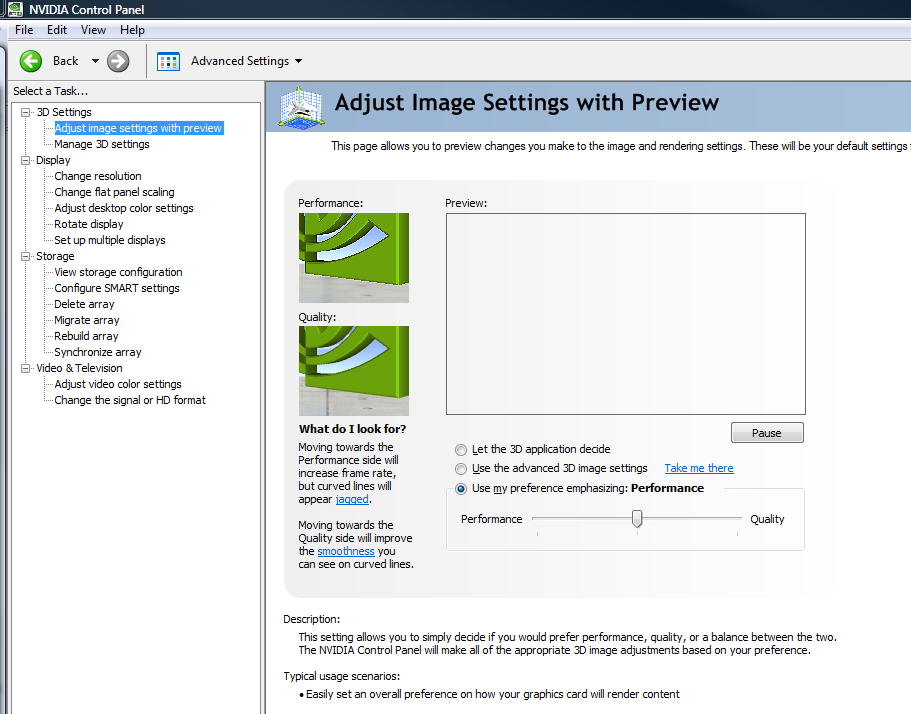
    Open up the NVidia Control Panel and set move the Image Settings slider from Quality to Performance.  This will change global performance, so we won’t leave it here.  This is just so we can write down what settings get set when it’s in Performance mode (versus Quality).  Note on the screenshot, the slider should be all the way to the left – apparently I took the screenshot before the UI updated all the way 🙂

    Now go to the Manage 3D settings and take note of the settings that it applied.  Here are mine:

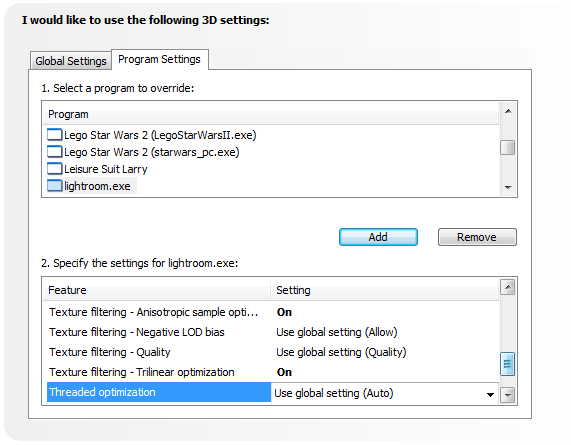
    Go back to the slider and put it back to Quality.  Then come back to the Manage 3D settings, but this time sleect the Program Settings tab.  Here’s where we’re going to tell the NVidia driver to use special (non-Quality) settings for just Lightroom.exe.  Click Add, locate Lightroom.exe, then set the individual settings to what you took note of earlier:

    Click Apply and you’re good to go.  Fire up Lightroom and see if you notice an improvement.  I noticed the adjustment brush felt very responsive, but the overall Lightroom UI seemed a little more sluggish.  This went away when I re-Enabled Triple Buffering (one of the last options in the window above).  So far, it seems to be running much smoother.

    Your mileage may vary, of course, but I hope this helps.

  • And now Google has a browser

    Oh boy, here they come.

    I just downloaded the Google Chrome Beta to take a quick glance at things.  In typical Google fashion, the UI is refreshingly sparse. See below for my very quick walkthrough.

    (more…)

  • 250 GB

    As most have probably already heard, Comcast has announced offical bandwidth limits for residential accounts.  250GB per month – go over it chronically and the big bad bandwidth police are going to shut your connection down!

    Yet they won’t provide access to bandwidth reports so you know if you should cut back for a while or not.  Nope, they’ll just be nice and let you know once you go over the limit.  Comcast – that’s like a car without a spedometer going through a speed trap.  Pathetic.

    Sure, they mention installing software on your PC. Oh, but if you’ve got more than one PC hooked up, you need to install something on each of them and add it up!  This is rediculous, because they aren’t going to care what number you come up with; if they say you’re over their limit, that’s it.  Back to the spedometer argument – No officer, my car says I was only going 65! Comcast – open the system up and let us see what you think our usage is.

    I particularly dislike how the limit is presented:

    The company said 250 GB equals downloading about 62,500 songs, 125 standard-definition movies or 25,000 high-resolution photos.

    All of this to elicit the response Oh my! nobody can possibly use all of that bandwidth, legally!  Shut those thieves down!

    Put like that, 250 GB sounds like a lot.  Well Comcast, at last check I have 190GB of backups.  Now that my private wireless link to Jay’s house is no longer possible, I had planned on sending it over the internet to his house (and his data to mine).  190GB + Jay’s data is going to put me well over the limit.  Wonderful – now automated offsite backups aren’t possible.  Thanks guys, you rock.

    And now on to some of the more broad aspects.

    • The United States is lagging far behind many other countries with respect to broadband internet – and our rank has been falling for years.  Great, this will help the situation.
    • It is more than likely that this is just the beginning of extra controls and limits.  We’re going in the wrong direction here.
    • Media, media, media.  In 2 years, that 250GB is going to go far less than it does today thanks to higher quality video and other media.  Can we get a promise this limit will be reevaluated every so often?  Doubt it.
    • How nice is it that they want you to use their on-demand video system, but want to limit your access to high-quality media if it’s coming from someone else?

    So, Comcast.  What can you do?  I have a few suggestions (other than ditching the limit, because we know that isn’t happening, now is it?)

    • Re-evaluate and update these limits on a periodic basis as time goes on (say, every 6 months).
    • Offer unlimited storage and bandwidth to some of your local servers, avoiding the big expense of hitting the backbone.
    • Since you’re going to continue limiting, how about a reasonably priced option for unlimited bandwidth?  Sure I could pay more for a slower business connection with you, but I don’t need your crack support team.

    We really need viable alternatives to Comcast.
  • Google SketchUp

    My next non-computer project is to design and build a toybox for David.  I’ve put off actually thinking about the plans because I didn’t feel like finding graph paper and a pencil, and I hadn’t really looked for software to assist in the design.

    But this afternoon was going a little slow and I ran across Google SketchUp again.  I say again, because I recall hearing about its initial release and trying it out.  I didn’t thing much of it at the time, and promptly forgot all about it.

    Little did I know cool and easy to use it is.  I watched a few short tutorial videos and I was up and running.  If you’ve got a need to make to-scale models, you should check it out (it’s free).

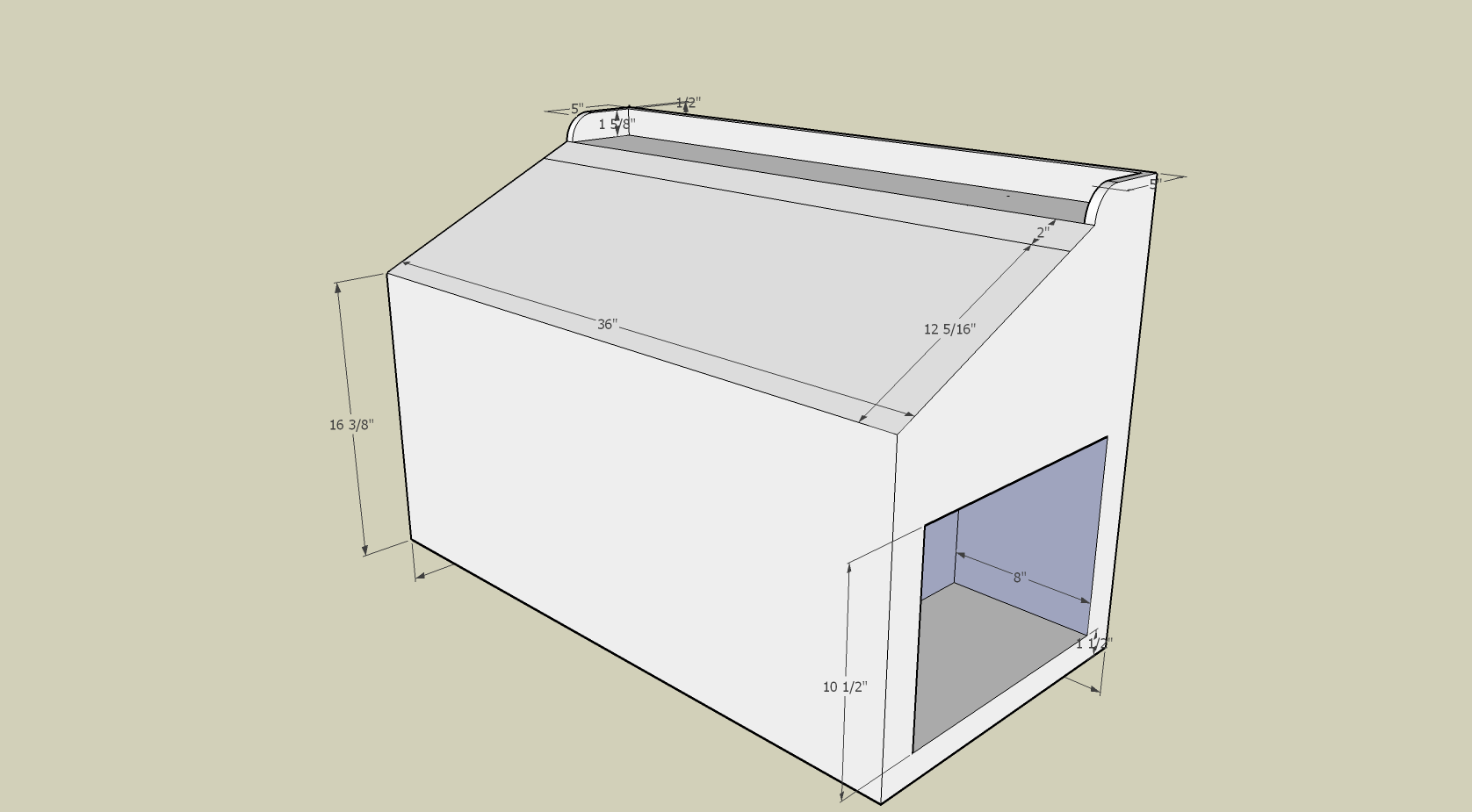
    Here are a couple initial views of the toybox I’m going to try building, stay tuned!

  • 364 Days Ago

    Tonight I fired up Axialis Icon Workshop and thought I’d check for updates since I haven’t run it in a while.  After installing the latest version, I looked for any new object packs which are just sets of icon building blocks their software allows you to quickly piece together.  There were two new ones out, so what’s so interesting about that?

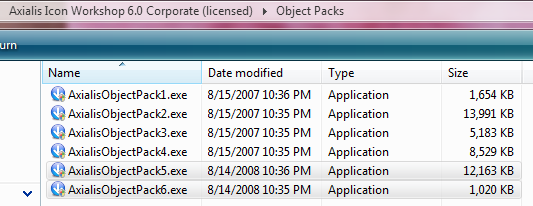
    I copied the installers out to the network and noticed the timestamps on the other object packs I have downloaded:

    If I had waited until tomorrow night, it would have been a year to the minute of when I downloaded the first several packs.