*Yawn*
Good morning! It’s 4:30 right now and we’re loading up to head to the hostpital. Roughly 3 hours before the baby arrives!
Ramblings of a geek with a few hobbies…
*Yawn*
Good morning! It’s 4:30 right now and we’re loading up to head to the hostpital. Roughly 3 hours before the baby arrives!
We are about 12 hours away from meeting Baby Johnson #2 for the first time. Ana is scheduled to undergo a c-section at 7:30am tomorrow. Ana and I will be at the hospital at 5:30 (yay!).
David is, for lack of better words, beyond excited. He has been bouncing off the walls all evening, far more than we’ve ever seen before. We can’t wait to see how he is tomorrow 🙂
I’m going to be posting updates here tomorrow instead of the social networks for simplicity, so be sure to stop by tomorrow and say hello to the little guy or gal.
We can’t wait!
I spent a couple hours outside shooting this afternoon while the others in the house were enjoying naps. I decided to drive over to Sangchris Lake and give my new 10-stop ND filter a try.
Before getting to the filter, however, I happened to get into a great position to _finally_ get a good shot of the Great Blue Heron. It seems like it is always flying nearby, until I have a camera handy.
The filter is fun to use, but a couple challenges come with it. First, since .1% of light is allowed through the filter, you can’t look through the camera with it on – it’s completely black. That makes focusing and composing tricky. It also makes it easy to take the long exposure only to find out that you left the lens cap on. Oops, that happened twice this afternoon 🙂
After dinner and helping get David ready for bed, I was able to make it out one more time just as the sun was going down. I debated for a while before going back out, but am glad I overcame the laziness:

This past Saturday I got up before dawn and drove out to Sugar Creek Covered Bridge, in hopes of getting a good looking, while unique, photo.
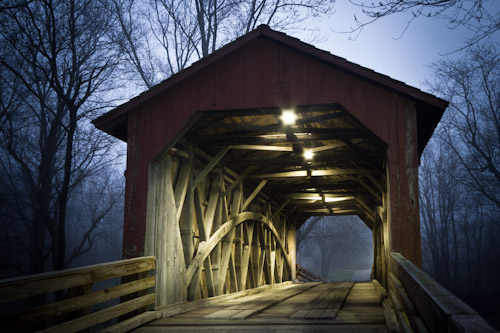
It’s very frustrating when you make such an effort and walk away without anything to show for it, but I don’t think this is one of those times. I made a few good ones, but this one is my favorite.
Even more interesting was that my 4 year old son came with me. He woke 5 minutes before me and was enthused the entire time. I think the chocolate milk, doughnut holes, and a chance to use a “big guy camera” helped with that.

Monday evening after dinner he asked if we could go for a walk and take pictures, so I got the cameras out and we went for a quick stroll around the neighboorhood. “Just me and daddy… taking pictures!”. Yeah, we’ll be doing that again soon.
Being Presidents’ Day, I was fortunate to have the day off from work. All weekend I was racking my brain trying ot figure out where I wanted to go spend my morning shooting. I left the house the same time as a typical work day, around ten til seven.
It wasn’t until I was in the car that I finally made my mind up to just head over to Sangchris Lake, even though I was going to be a tad too late for a sunrise photo I wanted.
When I arrived 15 minutes later, I was greeted with lovely steam rolling off of the lake. A beatiful sight, and once again I was glad I made the effort to head out.

All told, I spent around 3 hours hiking and taking pictures at the park. Such a pleasant morning.
Update: I’ve been notified by Mark that this is completely useless. Please disregard 🙂 In Win7 and 2008 you get the same option by just holding down Shift as you right-click. Thanks Mark!
Ever find yourself in Windows, browing through files and needing to copy a file’s full path? As a developer, this seems to happen often, and I today I got tired of not having a quick way of doing this.
A little registry tweak later, I now have a Copy Path command on my right-click menus in Windows Explorer.

This puts the path to the selected file (or folder) in the clipboard. Quite handy for quickly opening that file in an application without having to navigate folders or type the path.
Download and run the Regedit file here.
That menu option is just conigured to run the following PowerShell command:
c:windowssystem32WindowsPowerShellv1.0PowerShell.exe -Command “‘%1’ | clip”
Simple, yet very effective.
A couple days ago I posted about problems I’ve run into trying to use the QuickTime files created by my new Canon 7D.
Last night, someone from Corel contacted me with a few questions about the issue. After some back and forth, it became quite clear that there really shouldn’t be a problem – he was, in fact, running the exact same versions of VideoStudio and QuickTime as I, without issue.
This got me very curious, so I began poking around more. I ran ProcessMonitor in hopes of finding something out of the ordinary. With that software running, I went to open a .MOV file, got the error I was looking for, and checked the ProcessMonitor events captured:
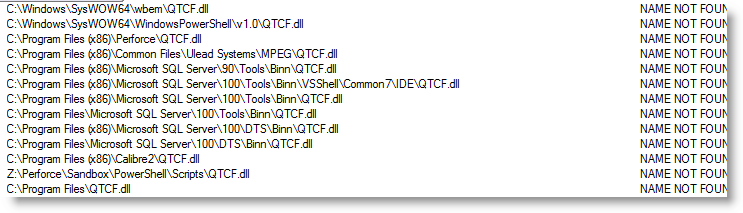 That looked curious – the app is presumably calling LoadLibrary on QTCF.dll and Windows is doing its best to locate it and finally gives up.
The Fix
Grasping at straws, I located that QTCF.dll down in C:Program Files (x86)quicktimeqtsystem and copied it into c:Windows. When I restarted VideoStudio, all of my QuickTime functionality was restored!
So, if you’re one of the people out there that has run into problems getting VideoStudio to view/edit QuickTime .MOV files, you may want to give that a shot. Hopefully it’ll work for you too.
On a side note, now that I can edit my MOV files directly I’m not sure if I’m comfortable having my videos archived in this format. .MP4 seems like it might be more durable, years from now. No?
I really like Corel VideoStudio Pro for video editing, and I’ve been using it for 4 years now. Unfortunately it really falls down when it comes to QuickTime videos. Now that I own a Canon 7D that records in QuickTime format, this is a problem.
The underlying issue is that the software seems to lose all knowledge of its QuickTime capabilities when QuickTime has been upgraded on the machine. Since I use iTunes on this computer for my iPhone and iPad, there’s no possibility for me to downgrade QuickTime for VideoStudio.
So tonight I set out to find a solution.
QuickTime Pro and some C#
I purchased QuickTime Pro ($30) and found that I could take a .mov file and perform a Pass Through MP4 conversion which essentially just strips the embedded mp4 data from the .mov file without doing any real transcoding. This is exactly what I want – I don’t want to lose any video quality just because I want the raw mp4.
The problem now is that this is a completely manual process that I would need to do on each and every video file. File -> Export -> MPEG-4 -> Pass Through -> blah blah.
There’s just no way that was going to work, so I decided to write some code against the QuickTime COM api to automate the process.
The following code is for a command-line executable that will do this mov to mp4 conversion to a batch of mov files:
using System;
using System.IO;
using System.Reflection;
using System.Threading;
using QTOControlLib;
using QTOLibrary;
using QuickTimePlayerLib;

namespace QTExtractor
{
    class Program
    {
        static void Main(string[] args)
        {
            // get the player, and the "control"
            QuickTimePlayerApp qtApp = new QuickTimePlayerApp();

            // have to wait for QT to open up.
            Thread.Sleep(5000);

            // get a Player instance
            QuickTimePlayer qtPlayer = qtApp.Players[1];

            // the exporter we will configure once and re-use
            QTExporter exporter = null;
            foreach (string movFile in args)
            {
                // open the movie
                qtPlayer.OpenURL(movFile);

                // get the QTControl
                QTControl control = qtPlayer.QTControl;

                // configure the exporter
                if (exporter == null)
                {
                    if (control.QuickTime.Exporters.Count == 0)
                    {
                        control.QuickTime.Exporters.Add();
                    }

                    exporter = control.QuickTime.Exporters[1];
                    exporter.TypeName = "MPEG-4";
                    exporter.ShowProgressDialog = true;

                    // load our embedded settings
                    string settingsXml = "";
                    using (Stream resourceStream = Assembly.GetExecutingAssembly().GetManifestResourceStream("QTExtractor.Settings.Settings.xml"))
                    {
                        if (resourceStream == null)
                        {
                            throw new InvalidOperationException("Unable to locate the embedded settings.xml file for use with QuickTime Pro.");
                        }

                        using (StreamReader reader = new StreamReader(resourceStream))
                        {
                            settingsXml = reader.ReadToEnd();
                        }
                    }

                    // set the settings xml
                    CFObject newSettings = new CFObject();
                    newSettings.XML = settingsXml;
                    exporter.Settings = newSettings;
                }

                // set the datasource to the new movie
                exporter.SetDataSource(control.Movie);

                // uncomment to obtain new settings xml for use in exports
                //exporter.ShowSettingsDialog();
                //string settings = exporter.Settings.XML;
                //File.WriteAllText(@"C:tempsettings.xml", settings);

                // just place the mp4 alongside the mov
                string targetFile = Path.Combine(Path.GetDirectoryName(movFile), Path.GetFileNameWithoutExtension(movFile) + ".mp4");
                exporter.DestinationFileName = targetFile;

                // Go!
                exporter.BeginExport();
            }

            // close the player
            qtPlayer.Close();
        }
    }
}
After building this, I added a shortcut to my Windows 7 SendTo folder.

Now, in my video folder I’m able to multi-select as many .mov files as necessary, righ-click and select Send To -> QTExtractor. An .mp4 file will be created for each .mov!

The only downside is that the QT UI pops up as it is working – I haven’t looked but I suspect I can’t get around this. Oh well, this should suffice until Corel gets their act together.
As 2010 turned into 2011, one of the things I decided I wanted to do was to spend more time behind my camera so I could improve my photography. I wanted to be far more deliberate in what I shot, when I shot, and how I shot.
It was early July when I had a problem with my Canon 30D and had to send it in for repairs, and during that week without my camera I did a quick assesment of my performance toward this goal. I wasn’t too happy: I had taken fewer photos than by the same time the year before; the year before saw me take even fewer photos than the year before that; and aside from a few images of David, I didn’t feel like I had much to be proud of, photographically speaking.
When I got my camera back from repairs, I decided to change that. I started picking out where I wanted to go shooting instead of just grabbing the camera when opportunity arised. I started picking weeknights to go on quick, hour-long shoots after we put David to bed. I also started being less insecure about showing my images to random people on the internet – from posting to photography forums for critique, to frequent sharing on the new Google Plus.
After the past 6 months of efforts, I can honestly say that I’m finally comfortable with what I’m able to do with my camera and no longer feel self-conscious to mention the word photographer in the same sentence as my name. Perhaps even more importantly, I no longer feel silly (for lack of a better word) for telling my wife “I’m going to go out and shoot ______”.
This barn I shot 3 days ago is a great example of the results of these deliberate efforts. I was only a month earlier that I saw it and told Ana that I was going to make sure I shot it. This is the exact shot I was picturing before I even drove up to it on Friday, and I spent over an hour covering it – far more than I would have done in the past.

I also ended up with a few other images I really like and am proud to say are mine.

Dumb Luck
In a case of having connections and sheer dumb luck, this photo ended up on the cover of the area phonebook (quite a few prints I’m told). I took it on a family walk at the Lincoln Memorial Gardens on July 4th.

A quick word on Google Plus.
G+ is filled with very good, and very enthusiastic photographers. Many times it feels like there’s just no chance in keeping pace, both in quality and quantity of work, but they sure provide motivation and encouragement. Most of the photos I’ve posted so far don’t get any +1s, or when they do they’re from friends an family (thanks!), but I’m hopeful that will increase in the next year.
On to 2012
I plan on continuing this progress in 2012; for those of you in my social networks, I apologize if you tire of my images – I think they’re only going to become more frequent 🙂
Thanks for reading!
For Christmas, Ana gave me a brand new Canon 7D to replace my trusty, but aging 30D. I can’t believe I’ve had that 30D for four and a half years!
Now that I’ve had a whopping 24 hours to play with it, I have to say that it’s a larger and more impressive jump than I expected. So far the things that I really like about it are, in no particular order:
I flipped on video recording for about a minute, and quickly came to the conclusion that I’ll continue using my HD camcorder for most things (camera shake!).
I’ll report back in a week or so with further impressions.
 The Johnson Blog