The Johnson Blog

Ramblings of a geek with a few hobbies…

  • Corel VideoStudio Pro and QuickTime, a Followup

    A couple days ago I posted about problems I’ve run into trying to use the QuickTime files created by my new Canon 7D.

    Last night, someone from Corel contacted me with a few questions about the issue.  After some back and forth, it became quite clear that there really shouldn’t be a problem – he was, in fact, running the exact same versions of VideoStudio and QuickTime as I, without issue.

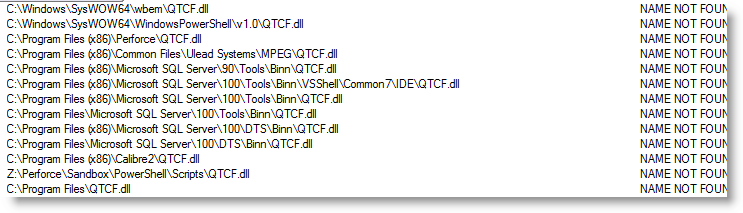
    This got me very curious, so I began poking around more.  I ran ProcessMonitor in hopes of finding something out of the ordinary.  With that software running, I went to open a .MOV file, got the error I was looking for, and checked the ProcessMonitor events captured:

    That looked curious – the app is presumably calling LoadLibrary on QTCF.dll and Windows is doing its best to locate it and finally gives up.

    The Fix

    Grasping at straws, I located that QTCF.dll down in C:Program Files (x86)quicktimeqtsystem and copied it into c:Windows.  When I restarted VideoStudio, all of my QuickTime functionality was restored!

    So, if you’re one of the people out there that has run into problems getting VideoStudio to view/edit QuickTime .MOV files, you may want to give that a shot.  Hopefully it’ll work for you too.

    On a side note, now that I can edit my MOV files directly I’m not sure if I’m comfortable having my videos archived in this format.  .MP4 seems like it might be more durable, years from now.  No?

  • Corel VideoStudio Pro and QuickTime, a Workaround

    I really like Corel VideoStudio Pro for video editing, and I’ve been using it for 4 years now.  Unfortunately it really falls down when it comes to QuickTime videos.  Now that I own a Canon 7D that records in QuickTime format, this is a problem.

    The underlying issue is that the software seems to lose all knowledge of its QuickTime capabilities when QuickTime has been upgraded on the machine.  Since I use iTunes on this computer for my iPhone and iPad, there’s no possibility for me to downgrade QuickTime for VideoStudio.

    So tonight I set out to find a solution.

    QuickTime Pro and some C#

    I purchased QuickTime Pro ($30) and found that I could take a .mov file and perform a Pass Through MP4 conversion which essentially just strips the embedded mp4 data from the .mov file without doing any real transcoding.  This is exactly what I want – I don’t want to lose any video quality just because I want the raw mp4.

    The problem now is that this is a completely manual process that I would need to do on each and every video file.  File -> Export -> MPEG-4 -> Pass Through -> blah blah.

    There’s just no way that was going to work, so I decided to write some code against the QuickTime COM api to automate the process.

    The following code is for a command-line executable that will do this mov to mp4 conversion to a batch of mov files:

    using System;
    using System.IO;
    using System.Reflection;
    using System.Threading;
    using QTOControlLib;
    using QTOLibrary;
    using QuickTimePlayerLib;
    
    namespace QTExtractor
    {
        class Program
        {
            static void Main(string[] args)
            {
                // get the player, and the "control"
                QuickTimePlayerApp qtApp = new QuickTimePlayerApp();
    
                // have to wait for QT to open up.
                Thread.Sleep(5000);
    
                // get a Player instance
                QuickTimePlayer qtPlayer = qtApp.Players[1];
    
                // the exporter we will configure once and re-use
                QTExporter exporter = null;
                foreach (string movFile in args)
                {
                    // open the movie
                    qtPlayer.OpenURL(movFile);
    
                    // get the QTControl
                    QTControl control = qtPlayer.QTControl;
    
                    // configure the exporter
                    if (exporter == null)
                    {
                        if (control.QuickTime.Exporters.Count == 0)
                        {
                            control.QuickTime.Exporters.Add();
                        }
    
                        exporter = control.QuickTime.Exporters[1];
                        exporter.TypeName = "MPEG-4";
                        exporter.ShowProgressDialog = true;
    
                        // load our embedded settings
                        string settingsXml = "";
                        using (Stream resourceStream = Assembly.GetExecutingAssembly().GetManifestResourceStream("QTExtractor.Settings.Settings.xml"))
                        {
                            if (resourceStream == null)
                            {
                                throw new InvalidOperationException("Unable to locate the embedded settings.xml file for use with QuickTime Pro.");
                            }
    
                            using (StreamReader reader = new StreamReader(resourceStream))
                            {
                                settingsXml = reader.ReadToEnd();
                            }
                        }
    
                        // set the settings xml
                        CFObject newSettings = new CFObject();
                        newSettings.XML = settingsXml;
                        exporter.Settings = newSettings;
                    }
    
                    // set the datasource to the new movie
                    exporter.SetDataSource(control.Movie);
    
                    // uncomment to obtain new settings xml for use in exports
                    //exporter.ShowSettingsDialog();
                    //string settings = exporter.Settings.XML;
                    //File.WriteAllText(@"C:tempsettings.xml", settings);
    
                    // just place the mp4 alongside the mov
                    string targetFile = Path.Combine(Path.GetDirectoryName(movFile), Path.GetFileNameWithoutExtension(movFile) + ".mp4");
                    exporter.DestinationFileName = targetFile;
    
                    // Go!
                    exporter.BeginExport();
                }
    
                // close the player
                qtPlayer.Close();
            }
        }
    }

    After building this, I added a shortcut to my Windows 7 SendTo folder.

    Now, in my video folder I’m able to multi-select as many .mov files as necessary, righ-click and select Send To -> QTExtractor.  An .mp4 file will be created for each .mov!

    The only downside is that the QT UI pops up as it is working – I haven’t looked but I suspect I can’t get around this.  Oh well, this should suffice until Corel gets their act together.

  • My Photography

    As 2010 turned into 2011, one of the things I decided I wanted to do was to spend more time behind my camera so I could improve my photography.  I wanted to be far more deliberate in what I shot, when I shot, and how I shot.

    It was early July when I had a problem with my Canon 30D and had to send it in for repairs, and during that week without my camera I did a quick assesment of my performance toward this goal.  I wasn’t too happy: I had taken fewer photos than by the same time the year before; the year before saw me take even fewer photos than the year before that; and aside from a few images of David, I didn’t feel like I had much to be proud of, photographically speaking.

    When I got my camera back from repairs, I decided to change that.  I started picking out where I wanted to go shooting instead of just grabbing the camera when opportunity arised.  I started picking weeknights to go on quick, hour-long shoots after we put David to bed.  I also started being less insecure about showing my images to random people on the internet – from posting to photography forums for critique, to frequent sharing on the new Google Plus.

    After the past 6 months of efforts, I can honestly say that I’m finally comfortable with what I’m able to do with my camera and no longer feel self-conscious to mention the word photographer in the same sentence as my name.  Perhaps even more importantly, I no longer feel silly (for lack of a better word) for telling my wife “I’m going to go out and shoot ______”.

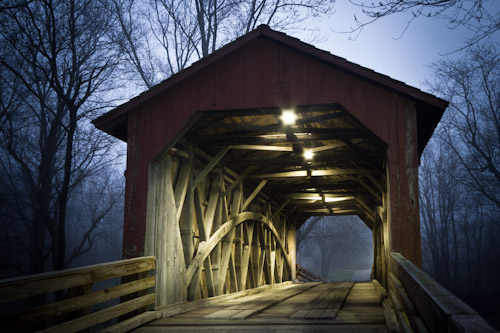
    This barn I shot 3 days ago is a great example of the results of these deliberate efforts.  I was only a month earlier that I saw it and told Ana that I was going to make sure I shot it.  This is the exact shot I was picturing before I even drove up to it on Friday, and I spent over an hour covering it – far more than I would have done in the past.

    I also ended up with a few other images I really like and am proud to say are mine.

    Dumb Luck

    In a case of having connections and sheer dumb luck, this photo ended up on the cover of the area phonebook (quite a few prints I’m told).  I took it on a family walk at the Lincoln Memorial Gardens on July 4th.

    A quick word on Google Plus.

    G+ is filled with very good, and very enthusiastic photographers.  Many times it feels like there’s just no chance in keeping pace, both in quality and quantity of work, but they sure provide motivation and encouragement.  Most of the photos I’ve posted so far don’t get any +1s, or when they do they’re from friends an family (thanks!), but I’m hopeful that will increase in the next year.

    On to 2012

    I plan on continuing this progress in 2012; for those of you in my social networks, I apologize if you tire of my images – I think they’re only going to become more frequent 🙂

    Thanks for reading!



  • First Impressions: Canon 7D

    For Christmas, Ana gave me a brand new Canon 7D to replace my trusty, but aging 30D.  I can’t believe I’ve had that 30D for four and a half years!

    Now that I’ve had a whopping 24 hours to play with it, I have to say that it’s a larger and more impressive jump than I expected.  So far the things that I really like about it are, in no particular order:

    • 100% viewfiender – it makes looking through the 30D feel like I’m looking through a straw.
    • Higher resolution – 18MP versus 8MP on the 30D
    • 19 Point Autofocus – wow it’s fast and sensitive in low light
    • Autofocus Zones
    • The M-fn button
    • LCD overlay in the viewfinder is really, really nice
    • Built-in flash acts as a Speedlite Master – hello wireless flash!

    I flipped on video recording for about a minute, and quickly came to the conclusion that I’ll continue using my HD camcorder for most things (camera shake!).

    I’ll report back in a week or so with further impressions.


  • Gingerbread House

    Last night we put together a gingerbread house kit. To me it looks like something straight out of a freaky Tim Burton movie.

  • 4 Years Old

    4 years ago I posted his first photo online and now, thousands (ok, tens of thousands) of photos later, David has turned 4 years old.

    It’s so hard to believe. On one hand time has flown, and on the other it seems like he’s been with us forever. Come April, he’s going to make one heck of a big brother.

    Happy Birthday Buddy!

  • Hoarding

    We are getting new flooring installed at home this week: hardwood in the new office and carpet in the family room and old office. It sure has been tiring, and now that we have two and a half rooms full of furniture sitting in our kitchen, we look like a nice family of hoarders.

    20111110-074055.jpg

  • Number Form Synesthesia

    Today as I was doing my morning sweep of news and social networks I ran across a post on Google+ where someone mentioned they had Synesthesia – a form of which allows them to hear colors.  That’s right, hear colors.

    This caught my attention so I began reading about synesthesia on the wiki page linked above.  As I’m scrolling through the page, I run into:

    Number line, courtesy Wikipedia

    If you know me, in the past I may have mentioned that several years ago I learned that how I see numbers apparently isn’t typical.  I see them on a path – one that is and always has been the same.  What shocked me about the image above is that it’s nearly identical to how I see numbers. The circle from 1-12 (although mine tends to take a slight horseshoe-shape), the peaks and valleys in-between each decade, a repeat of the circle at 100-112, 200-212, etc.. The only real difference is that my path keeps rising up to the left (the 200s are higher than the 300s) and the circle/horseshoe thing with 1-12.

    If I’m counting, I sort of zoom-in on the particular number I’m on (each number on the path is written in a space like a board game), with my point of view, or camera angle, changes based on where I’m at on the number path.

    After further reading, I also found that not everyone has a path for the days of the week, the months of the year, or years in general.  Strange.

    I’ve never had a way of naming or describing this, but now I do.  It’s called Number Form Synesthesia, and apparently I have it.

    The brain is a fascinating thing.


  • Pike County Fall Color Drive

    This morning we left the house and headed over to Pike County, Illinois for their annual Fall Color Drive.  The drive consists of a collection of small towns in western Illinois playing host to the travelers, with a variety of activities.

    The trees have only begun changing colors, so it wasn’t much of a Color Drive.  But it was still fantastic weather and we all had a good time.

    The first place we planned on visiting was Time, IL.  A town so small that Motion-X GPS didn’t recognize it (no worries, Google Maps on the iPhone stepped up).  En route to Time, we passed an intersection in Milton, IL which we just couldn’t pass up.

    Tractors, old tractors, antique tractors, and more tractors!  We didn’t count but I’d estimate there were at least two and a half dozen on the lot and packed into a couple buildings.

    David could hardly contain himself.  I think he sat in a dozen, his butt barely able to stay in a seat for five seconds before seeing the next one he wanted to experience.

    And there was a combine he just couldn’t get enough of.  When we told him he had five more minutes and could pick one more to sit on, he immediately went back to it.  I think this picture sums it up.

    Here’s what his hands looked like after the tractor jungle.

    After starting a day with a bunch of tractors, the rest is sure to be a let-down for a three year old  boy.  But he was a good sport and had a very fun day regardless.

    Our next few stops included seeing a set of blacksmiths, a knife maker, plenty of bonfires, and much more.  We ended our westward journey in Hannibal, MO which was having their annual Fall Festival.

    After lunch, our trip up too many stairs to count, and the lighthouse, we headed back to Springfield with root beer, cajun roasted peanuts, and a bag full of fudge in hand.

    Good times.

    I’ve got plenty of photos, which I’ll get edited and posted soon.

  • Well That Didn’t Take Long

    It was under a year ago, on the TSA scanners/pat-downs, I wrote:

    How long before you need to go through one of these before going into the DMV? The grocery store? Ballgames? Theaters? Just use your imagination. Before you know it, in any given day you’ll be violated by any number of “officials”. And it will be considered normal. And OK.

    And what headline do I see today?

    NFL wants pat-downs from ankles up at all stadiums

    That’s right, random creepy stadium gate guard will be patting you down.